Showing posts with label useful functions. Show all posts

Monday, February 6, 2012

Using apply() to create a unique id

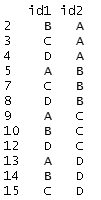
Suppose you have a data set with two identifiers. For example, maybe you're studying the relationships among firms in an industry and you have a way to link the firms to one another. Each firm has an id, but the unique unit in your data set is a pairing of ids. Here's a stylized example of one such data set:


In the example that motivated this post, I only cared that A was linked with B in my data, and if B is linked with A, that's great, but it does not make A and B any more related. In other words, the order of the link didn't matter.

In this case, you'll see that our stylized example has duplicates -- id1 = "A" and id2 = "B" is the same as id1="B" and id2 = "A" for this purpose. What's a simple way to get a unique identifier? There's an apply command for that!

Thinking of each row of the identifier data as a vector, we could alphabetize (using sort(), so c("B", "A") becomes c("A", "B")), and then paste the the resulting vector together into one identifier (paste, using collapse). I call our worker function idmaker():
idmaker = function(vec){
return(paste(sort(vec), collapse=""))
}
Then, all we need to do is use the apply command to apply this function to the rows of the data, returning a vector of results. Here's how my output looks.


To get a data frame of unique links, all we need to do is cbind() the resulting vector of indices to the original data frame (and strip the duplicates). Here's some code:

co_id = apply(as.matrix(df[, c("id1", "id2")]), 1, idmaker)
df = cbind(df, co_id)
df = df[!duplicated(df[,"co_id"]),]

Here is the resulting data frame with only unique pairs.


Sunday, June 5, 2011

An application of aggregate() and merge()

Today, I encountered an interesting problem while processing a data set of mine. My data have observations on businesses that are repeated over time. My data set also contains information on longitude and latitude of the business location, but unfortunately, my source only started providing the longitude and latitude information in the middle of the data set. As a result, the information is missing for the first few periods for every business, but across businesses, I have latitude and longitude information for virtually all of my data set.

As long as the business hasn't shifted location, this isn't a problem. I can just substitute the lat-long information from the later periods into the earlier periods for each business. This sounds simple enough to do, but when one has a data set with 70,000 observations, an automatic process saves a lot of time and can help avoid mistakes.

Let's start by building common ground. Here is a script that you can use to simulate a data set to follow along.


Once you run this script, the data frame mydat is a balanced panel of 125 businesses observed over 25 time periods (my actual data set is an unbalanced panel and the solution I present works just as well for unbalanced as with balanced. It is just easier to simulate a balanced panel). Each observation has a business identifier (BusID), a time period identifier (per), as well as simulated data on latitude and longitude.

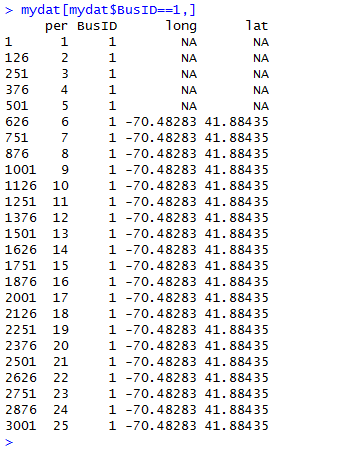
To see the problem with this data set, examine the data for the first business using the command mydat[mydat$BusID==1,]. Here's a screenshot of the output.


This problem occurs throughout the data set and we would like to just substitute the lat-long values we have for the right missing ones.

How did I solve my NA problem? I used aggregate(), a function that quickly and conveniently collapses a data frame by a factor or list of factors. With aggregate(), you can take the mean, compute the max, compute the min, sum the values or compute the standard deviation by the levels of the collapsing factor. The aggregate() function also has a na.rm option that allows us to easily ignore the NA values (useful here). In our example, we could collapse by taking the mean or computing the max or the min; the result will be the same because latitude and longitude do not vary for the same business over time.

Let's collapse by taking the mean withing each level of BusID. The result of my use of aggregate() is a data frame that upon merging with the original data frame (using merge()), fills in the missing latitude and longitude values. The following code implements this strategy to fill in the NAs in our simulated data set.


Before leaving you to have fun with aggregate() and merge(), several points are worth mentioning.

First, the aggregate() function requires that the collapsing factor(s) is (are) stored in a list. This is why the code uses list(BusID=mydat$BusID) when mydat$BusID would seem more natural. The list() part is necessary to get aggregate() to work.

Second, it is useful for merging in the second step to give the attribute in the list the same name as the variable name in the original data frame. The BusID= part of the list(BusID=mydat$BusID) command is a convenient way to prepare the resulting data frame for merging.

Third, my code uses -c(3,4) to drop the 3rd and 4th columns of the original data frame (the ones with the original lat-long data) before merging it with the collapsed latlong data frame. This is important so that the merge() command doesn't get confused about which columns to use for matching. If you leave these columns in mydat, R's merge will try to match the values in those columns as well (because they have a common name with those columns in latlong).

Finally, the data in this example are in a different order now that we merged on BusID. If this bothers you, you can use order to sort the data set by time period as in

myfinaldat=mycleandat[order(mycleandat$per),]

As this last step is purely a cosmetic change to the data set that will not affect subsequent analyses, you can leave it out.

Although this example was my solution to a rather specific problem, it illustrates how to use some useful commands. To the extent that these commands are widely applicable to other problems, I hope you find uses for these commands in related applications.

Saturday, May 28, 2011

An Application of boot() to IV regression

Bootstrapping standard errors can be a useful technique when obtaining closed form for the standard error formula is difficult or intractable. In this post, I give an example of how to use R to create a bootstrap sampling distribution in the context of IV regression. Specifically, I use boot() to automatically augment a function of mine to resample the indices of my data set with replacement (see the code in the function below).

In my application, I present a function that uses the boot library to report bootstrap standard errors for an instrumental variables regression. My ivboot() function builds on the iv() command I wrote for the tonymisc library.*

Now, onto the ivboot() example. Start by loading the tonymisc library and some data from the library, as well as the boot library.


We can run the following R script to define the function ivboot().


When applied to data and an IV regression model, the ivboot() function creates an IV regression object that -- when tonymisc is loaded -- is compatible with mtable() output. The only difference between an ivboot()-created object and an iv() object is that the ivboot() object has standard errors that are based on the bootstrap distribution of the coefficient estimates (Statistics other than the second-stage coefficient estimates are not bootstrapped).

Here is some code to compare the bootstrap output to the analytical standard error output:


On this small sample (N=100) of simulated data, the ivboot() command took less than a minute to run on my computer (timing of may vary depending on your computer). For much larger data sets, this will be slower. If you have a larger problem or lower standards (or higher standards, your choice), you can use the boots option to ivboot() to specify the number of bootstrap samples. Currently, I have set the default to 500, but you could specify boots = 200 if you want the command to run faster (boots = 10 will make it run even faster, but I don't recommend that!).

Here is the mtable() output, which can easily be ported into LaTeX using the toLatex() command.


*This standard output from an
mtable() extension to my iv() command provides quite a bit of information in a convenient format. Another nice feature of iv() is that iv()-created objects have first-stage summary information readily stored in the object for extraction and analysis.

Friday, May 20, 2011

Defaults, Lists and Classes: A Functional Post

In this post, I demonstrate a couple of useful tricks to writing functions in R. The context is a function I wrote called called samp() that allows for an easy demonstration of sampling distribution properties.


Defaults

By default, this function draws K = 500 samples of size N from a normal distribution with a mean of mu = 0 and a standard deviation of std = 1. As you can see, the syntax for specifying a default for an argument to the function is to set it equal to its default value inside the function statement. Arguments can be given no default by naming them as an argument to the function without specifying their default value.

Sensibly chosen defaults can save a lot of time for people who use your function. For example, although this samp() function has four arguments, I don't need to type samp(100, 0, 1, 500) every time I wish to take 500 samples of size N=100 from a Normal(0,1) random variable. If sampling from a Normal(0,1) is especially common, setting the defaults this way can save a lot of keystrokes.

On the other hand, using defaults instead of hard coding the Normal(0,1) choice has the distinct advantage that users get flexibility from your function giving them the option to specify arguments other than the default. The right use of defaults strikes the perfect balance between ease of use and flexibility.

Returning a List... with Names

If your function warrants the special treatment, you have probably performed several useful calculations that you would like to return. Maybe you have conducted several related hypothesis tests that you would like to reference later (report and/or use in another calculation). A great way to do this is to store the results of your function into a list.

For example, in the samp() function, I wanted to store vectors of the sample means, sample standard deviations and standard errors (500, one for each replication). For good measure, I wrote the function to store the means and standard deviations of these vectors as well as the true parameter values that went into the function.

Although it is often a good idea to store the results in a list, it is a better idea to name the elements of the list for easy extraction. If I ran the command

mysamp = samp(100)

The object mysamp would contain a list of the results from the function samp(). Suppose I want to extract the vector of means (for example, to compute a histogram). Without running the names command, I would have to remember that the vector of means was in the first position in the list and use the command

hist(mysamp[1])

to plot a histogram of the means vector from my sampling object. As it is easy to forget the precise order in which the elements of a function are stored, this syntax can lead to too much thinking. It is better to name the first list element something like means. Naming the list elements allows the user to use the $ extractor on objects created with the function. That is, the syntax becomes

hist(mysamp$means)

which is much easier to remember and easier to read. This latter fact is often unappreciated, but if you get in the habit of naming elements in a list, you will be a better collaborative coder. Even if you're not into collaboration, when you return to that project after two weeks of doing something else, it is much easier to remember where you left off.

A Benefit of Keeping It Classy

Another coding practice that often goes unappreciated is the use of classes to make your life easier (and your console cleaner). At this point, if you type mysamp into your console window, R will bombard you with more than a screen's worth of output. Most of this is output that I don't want to see printed out. I might want to save it for later, but I don't want to save it.

This is where the class(result) = "samp" command comes in handy. By "classing" my object this way and writing a short a print method for this class (named print.samp()), I can cut down on the amount of output I have to see when I inspect my object. Here's code to define a print method.


Now, try typing mysamp into R. You will see much less output (only the output from print.samp), but the object mysamp still has all of the information you want to keep around. If you don't believe me, just type mysamp$means to be sure.

Just as we could "class and print," we can also "class and plot." This can be handy if you want there to be a standard meaning for the command plot(mysamp). In our working example, let's make this command mean plot three histograms, one for means, one for standard deviations and one for standard errors. Here's some code that imposes this meaning on objects with class "samp"


In case you were wondering what this plotting out looks like, here is the picture that is produced from the command plot(mysamp).

Thursday, May 19, 2011

Porting Stata-like Marginal Effects to LaTeX

The TimeSeriesIreland Blog posted an excellent start on a function that automatically computes marginal effects for probit and logit models. As I have always wanted an easy-to-use function that computes and reports marginal effects in R, I was elated to see the function and I couldn't wait to use it.

My initial impression when I saw the post was: "I should write an mtable() extension for that to go with my other extensions." With this in mind, I started familiarizing myself with the code and I contacted the author to make sure he was fine with me extending his code (and adding it to my package with mtable() extensions). As he was fine with my goal of extending the function, here is a post where I introduce you to a new extension to mtable().

Important Caveat: At this point, the function does not do the technically "right" thing (delta method) to obtain the standard errors on the marginal effects. Instead, it supposes that the z-score will remain constant across the transformation, which isn't quite right. Even though it isn't perfect, in most of the examples I have tried, the results are almost identical to Stata output. You tend to get more divergence from the Stata solution for dummy variable regressors (where Stata computes a discrete jump rather than a derivative).

One would think that an extension of mfx() would use mfx(), but that didn't turn out to be the easy way to go. After many unsuccessful attempts (more about this in a future post; I learned some things worth sharing), here's the solution I landed on.

First, define an "mfx" object with a function that changes the class attribute of a fitted glm object to. Here's code to define a function to do this.


Second, make sure you have the memisc library loaded with the command library(memisc) -- or library(tonymisc), which loads memisc among other excellent packages.

Third, until I get the kinks worked out and port this into my package, you'll have to run code to define a getSummary.mfx() method to extend mtable. Here's some code that will do this.


Now, I suppose you want to know how this extension works. Here's an example that uses some data from the wonderful Ecdat library (a great source for Econometrics data sets).


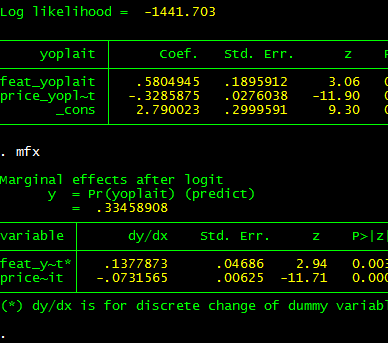
Here's the output to R's console. Note that feat.yoplait is a dummy variable for whether Yoplait had a featured advertisement that particular week. Based on my caveat, you wouldn't expect the output to be identical to Stata.


And, as you can see (compare with Stata output below), it isn't exactly the same, but if you are trying to understand the qualitative importance of your estimates, it isn't too bad.


Two bugs (quirks, kludges) remain: (1) I want to get the standard errors precisely right, (2) I want to convince mtable() to stop reporting the intercept for the marginal effects (as the intercept doesn't change, it can't have a marginal effect!). Even before I get around to this, I hope this code will have a positive marginal effect.

---

Update: The original post to which this post refers is no longer available because the TimeSeriesIreland Blog appears to have been taken down. I leave this post up subject to two caveats: (1) the standard errors are not quite right for the marginal effects and (2) the marginal effects for dummy regressors are not computed for a discrete jump from 0 to 1. Otherwise, you may find this tool useful.

Subject to the caveats in this post, if you want access to this function and a related function that is more summary()-like, I have included it in my CRAN-contributed package tonymisc (see the tab at the top of this page).

Monday, May 9, 2011

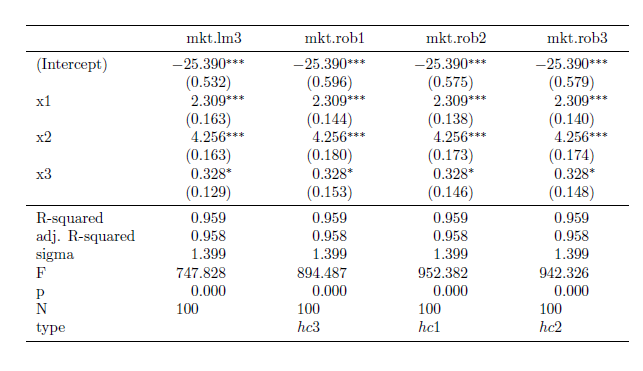
Extending mtable() to ivreg, gls and robust standard errors

I have written several extensions of the mtable() command in the memisc library that may come in handy. The methods are available in a package I have written called tonymisc (now, available on CRAN). A zipped folder with my package files is available for download here.

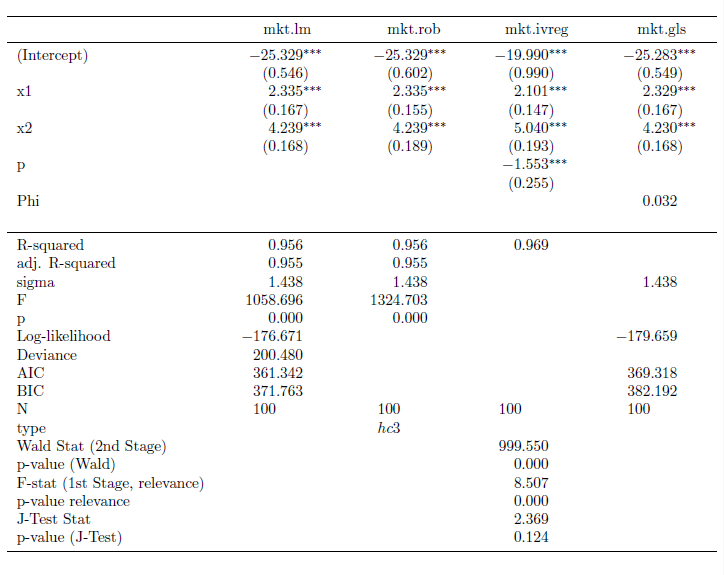
My extensions to mtable() allow users to easily summarize (and port into LaTeX tables) lm() objects with robust standard errors, gls() objects (created using nlme's gls) and ivreg() objects (created using AER's ivreg). If you would like to see how the output looks, here's some example code:


This code produces the LaTeX code behind this table.


I also implemented a feature through my robust() command to allow the user to select which variables he/she would like to see in the table output. Here's some example code for that feature:


The output from this code is this table:


To get this package to work for you, simply use the command install.packages("tonymisc", dependencies=TRUE), as you would normally do to install packages from CRAN. copy the tonymisc folder (available for download here) into your R library of packages. Once it is in the right place, all you need to do is load it with the library(tonymisc) command.

I am still working on the details of the package (help files, extra features, extensions of what I have done, internal consistency, loading other packages by default, ease of use, etc.), but I would be happy if people find it useful at this stage. In particular, I still need to implement some ideas from the comments (the next version will contain these). If you have other suggestions, please leave a comment to let me know.

Tuesday, May 3, 2011

Putting Robust Standard Errors into LaTeX Tables: An Extension of mtable

I recently discovered the mtable() command in the memisc library and its use with toLatex() to produce nice summary output for lm and glm objects in a nicely formatted table like this:


Once you have your linear model objects, all you need is one command -- a composite of toLatex() and mtable(). Here's the R code I used to generate the LaTeX code:


All you need to do from here is to copy the code into your LaTeX document (or in my case LyX document with evil red text), where you use the dcolumn and booktabs packages (specify this in the preamble using \uspackage{} for each package).

This is really straightforward ... as long as you just want to use lm or glm objects with no deviations from that baseline. But, what if you -- as many econometricians do -- want to estimate your linear model with heteroskedasticity-consistent standard errors?

How to do it with "robust" standard errors

My favorite way to robustify my regression in R is to use some code that John Fox wrote (and I found in an R-help forum). He called it summaryHCCM.lm(). In my own applications, I have renamed it summaryR() because "R" makes me think "robust" and it is fewer keystrokes than HCCM. I modified the output of the code to work better with what follows:


Suppose I would like to produce nicely-typed output like the above table, but with robust standard errors. Unfortunately, the summaryR() solution doesn't map naturally into our mtable() solution to producing nice LaTeX output. But, fortunately, there is a solution.

(If you just want this to work, copy and run all of the code from here to "so we are all set." No need to understand the implementation details. If you're interested in understanding how I arrived at my solution, here come the details)

It turns out that there is a way to map the summaryR() command to the mtable() command to produce nice LaTeX output with robust standard errors. Once we have the commands, the syntax is just as easy as using summaryR() directly and it makes creating LaTeX table output easy. So, what do we do?

First, we need to adapt the methods behind mtable() to allow it to recognize something that I call a "robust" object. To do this, we need to write a function called getSummary.robust()


and we need to set some formatting options using the setSummaryTemplate() command:


Second, we need to convert a linear models object into something called a "robust" object. The robust() command does this:


So, we are all set. If you run all of the preliminary code in this post, you're in good shape to produce LaTeX tables with robust standard errors like this table:


Once the functions are defined, the syntax is straightforward. Here is the code I used to put together the the table (plus, one step to copy the output into my LyX file)


I hope this is helpful. If you're interested in other extensions of mtable(), here's an excellent post.

Finally, I am still learning I learned how to bundle functions into a package (so I haven't made this available as a package yet). Today, I was able to successfully package this set of functions into a package called tonymisc on my computer. Once I organize the help/example/other fun parts of the package, I will see about making this and my extension for ivreg objects available. This package (in its first version) is available on CRAN through install.packages("tonymisc").

Monday, April 25, 2011

Merging Data Video Tutorial

Here's a video tutorial where I walk through some code that does what the previous post describes.


The FRED data is used extensively for macroeconomics. You might these data useful for joining in graph fights in the blogosphere.

Sunday, April 24, 2011

Merging Multiple Data Files into One Data Frame

We often encounter situations where we have data in multiple files, at different frequencies and on different subsets of observations, but we would like to match them to one another as completely and systematically as possible. In R, the merge() command is a great way to match two data frames together.

Just read the two data frames into R


mydata1 = read.csv(path1, header=T)
mydata2 = read.csv(path2, header=T)


Then, merge

myfulldata = merge(mydata1, mydata2)

As long as mydata1 and mydata2 have at least one common column with an identical name (that allows matching observations in mydata1 to observations in mydata2), this will work like a charm. It also takes three lines.

What if I have 20 files with data that I want to match observation-to-observation? Assuming they all have a common column that allows merging, I would still have to read 20 files in (20 lines of code) and merge() works two-by-two... so I could merge the 20 data frames together with 19 merge statements like this:

mytempdata = merge(mydata1, mydata2)
mytempdata = merge(mytempdata, mydata3)
.
.
.
mytempdata = merge(mytempdata, mydata20)


That's tedious. You may be looking for a simpler way. If you are, I wrote a function to solve your woes called multmerge().* Here's the code to define the function:

multmerge = function(mypath){
filenames=list.files(path=mypath, full.names=TRUE)
datalist = lapply(filenames, function(x){read.csv(file=x,header=T)})
Reduce(function(x,y) {merge(x,y)}, datalist)


After running the code to define the function, you are all set to use it. The function takes a path. This path should be the name of a folder that contains all of the files you would like to read and merge together and only those files you would like to merge. With this in mind, I have two tips:
  1. Before you use this function, my suggestion is to create a new folder in a short directory (for example, the path for this folder could be "C://R//mergeme") and save all of the files you would like to merge in that folder.
  2. In addition, make sure that the column that will do the matching is formatted the same way (and has the same name) in each of the files.
Suppose you saved your 20 files into the mergeme folder at "C://R//mergeme" and you would like to read and merge them. To use my function, you use the following syntax:

mymergeddata = multmerge("C://R//mergeme")

After running this command, you have a fully merged data frame with all of your variables matched to each other. Of course, most of the details in matching and merging data come down to making sure that the common column is specified correctly, but given that, this function can save you a lot of typing.

*Maybe a function like this exists out there already, but I think it is entertaining to write helpful functions. I also trust the functions more if I write them myself and test them on my own problems.

Tuesday, April 19, 2011

Common Data Creation Commands

Here is a video tutorial where I go through some of the most commonly used commands in creating and manipulating data. As soon as I want to do more than just running a single regression, I use these commands more than any other set of commands (in some of the other videos, you may have seen these).


Here is the code I use in the video if you would like to try out these commands for yourself.

Sunday, April 17, 2011

A Creative Use of R

Update (5/18/2011): Looks like Freakonomics approves as well. Let the record show that I approved first :)

I approve: "I use the open-source program R to create the patterns."


But, I'm not sure I approve of calling these distributions "evil."

In case you were wondering, here are the commands to create the density plots for these "evil" distributions.

Poisson: dpois
Weibull: dweibull
Gumbel: dgumbel
Cauchy: dcauchy
Erlang: dgamma. It's a special case of the Gamma distribution. A special case of Erlang is the Chi-squared distribution.

Thursday, April 14, 2011

Computing Statistical Power

Today's task is to compute a statistical power function in R. For a good definition of power, go here. Thinking about the power of a testing procedure is an often-overlooked aspect of hypothesis testing.

I also explain what power (in a statistical sense) is in the video, as well as use my shadenorm() function to show what power looks like on the classical hypothesis testing graph. Along the way, I demonstrate how writing a function can make your life easier. Here's the video:


Here is the script file I walk through in the video (copy into notepad for a better view):


My script file uses a new version of my shadenorm() command that is a little easier to use (only change: now, there are no justbelow or justabove arguments. If you just specify below, that's justbelow=TRUE...).

This is available here:

Tuesday, April 12, 2011

Video Tutorial on Robust Standard Errors

Update: I have included a modified version of this summaryR() command as part of my package tonymisc, which extends mtable() to report robust standard errors. The tonymisc package is available on CRAN through the install.packages() command.

If you have the right R commands at your disposal, it is simple to correct for heteroskedasticity using the robust correction that is commonly-used among economists. I recorded a video tutorial to describe the simplest (and most flexible) way I know to get R to compute robust standard errors.

The key is to use a "summary-style" command that has an option to correct for heteroskedasticity. The command I like to use is called summaryR(). Here is the script file with the summaryR() command.


I found this function on an R-help discussion board where several people were answering someone's question about extending the summary.lm() command.

I deserve none of the credit for writing this (credit goes to John Fox), but I consider it my duty to point out how nice this function is. I demonstrate how to use the function in this video


Here are is the script file I used in the video:


Here's a link to the data set.

Sunday, April 10, 2011

Video Tutorial on IV Regression

Update: [1 May 2011] I am working on a better augmentation of the current IV regression functions (specifically ivreg() in AER) in R. I will post a link here to my new method/function for IV regression when I finish debugging the code.

Update 2: [15 May 2011] The function I wrote here does not work with factors due to the way in which I constructed fitted values for the standard error correction in the second stage.

I recorded a new video tutorial on how to conduct an IV regression. This time I used my new ivregress() command, which has much better syntax than my old one. There are several reasons I needed to do this:

  1. Relative to my previous post on IV regression, I have added the ability to conduct overidentifying tests. Now, my ivregress() command has all of the basic functionality of Stata's 2sls option to ivregress.
  2. Relative to my previous video tutorial on IV regression, this video uses my newer command, which as much better syntax. As such, I will use this video tutorial to replace the old one.

Here is the R script file I used to define my ivregress() command and its companion summary command sum.iv().


To get ivregress() and sum.iv() to work, (1) copy the text in the above text box into an R script, (2) run all (or just download and run the R script) and (3) save into your default workspace if you want to use the commands into the future. Then, you're good to go. See my video demonstrating how to use the command here:


Here is the code I used to produce the output in the video.


Finally, here is a link to the synthetic "market share" data I used in the video.

I hope you find this command helpful.

Sunday, April 3, 2011

How to Shade Under a Normal Density in R

The easiest-to-find method for shading under a normal density is to use the polygon() command. That link is to the first hit on Google for "Shading Under a Normal Curve in R." It works (like a charm), but it is not the most intuitive way to let users produce plots of normal densities.

In response to the standard polygon() approach, I wrote a function called shadenorm() that will produce a plot of a normal density with whatever area you want shaded. The code is available here (in a newer post; I updated the function slightly).

Copy into an R script and run all of it if you want to use the shadenorm() command. To show you how to use it, I also recorded a video tutorial in R to demonstrate how to use the shadenorm() command.


Here is the code I use in the video:


There are a lot of applications where you may want to produce a plot with a normal density with some region shaded. I hope you find this function useful.

Thursday, March 10, 2011

An easier to use IV regression command in R

Update: I have added some functionality to my ivregress() command. Check out my newer post here.

After I posted my last video tutorial on how to use my IV regression function, I received a comment asking why I didn't write the command a different way to make the syntax easier to read.

The answer is that I didn't know how to write an easier to use function a year ago (when I wrote the ivreg() function). After some digging, I figured out how to work with "formula objects" in R and the result is an easier to use IV regression function (called ivregress()).

How to "install" ivregress()

Here's the code you need to run to define ivregress() and its companion summary command sum.iv(). This will provide instrumental variables regression estimates if you have one endogenous regressor with one or more instruments.


You only need to run the above code once to define the function object ivregress() for all future uses (as long as you don't write over it or clear your workspace).

How to use ivregress()

To create an "IV object" simply use the ivregress command as follows (the command relies on the car library):

library(car)
myivobject = ivregress(Y~X1+X2+...+Xk, Xj ~ Z1+Z2+...+Zl, dataframe)

where X1, X2,...Xk are second stage regressors, Xj is an endogenous regressor for which you would like to instrument, and Z1, Z2,...,Zl are instruments.

Then use sum.iv() from the previous posts to produce summary output. Sometime soon, I will post a video tutorial showing how to use ivregress() to perform IV regression.

Tuesday, March 8, 2011

Video Tutorial on Instrumental Variables in R

Update: I have replaced this video tutorial with a video tutorial on a newer, easier to use IV regression command. Check out that command here.

In this video, I show how to use my instrumental variables function in R, ivreg(), along with its companion summary command, sum.iv().


Here is a link to the synthetic "market share" data I used in the video.

IV Regression

Update: Since this post, I discovered a bunch of better ways to conduct 2SLS regression in R. These methods do not allow the user to look under the hood to see what is going on (so this post may be instructive anyway). If you're interested, ivreg() in AER, tsls() in sem and systemfit() in systemfit are good options. My package tonymisc also has a command, iv() that works when some or all of these fail. I'm working on making that function better (5/18/2011)

Here is my code from a previous post that performs IV regression. This may be easier to copy into an R script. I will post a video tutorial using this code shortly.

Sunday, May 23, 2010

Two-stage least squares

Update: Since this post, I discovered a bunch of better ways to conduct 2SLS regression in R. These methods do not allow the user to look under the hood to see what is going on (so this post may be instructive anyway). If you're interested, ivreg() in AER, tsls() in sem and systemfit() in systemfit are good options. My package tonymisc also has a command, iv() that works when some or all of these fail. I'm working on making that function better (5/18/2011)

Here is some code I wrote that allows you to easily perform two-stage least squares regression using R.

ivreg = function(Y0,X0,Z10=NULL,Z20,data.df){   
Y = data.df[[Y0]]
X = data.df[[X0]]
Z1 = NULL
if(length(Z10)>0){
Z1 = data.df[[Z10[1]]]
}
Z2 = data.df[[Z20[1]]]

if(length(Z10)>1){
for(i in 2:length(Z10)){
Z1=cbind(Z1,data.df[[Z10[i]]])
}
}

if(length(Z20)>1){
for(i in 2:length(Z20)){
Z2 =cbind(Z2,data.df[[Z20[i]]])
}
}

## First Stage
Z = cbind(1,Z1,Z2)

zPz = t(Z)%*%Z
zPx = t(Z)%*%X
zPz.inv = solve(zPz)
beta.f = zPz.inv%*%zPx

xhat = Z%*%beta.f
SSE.f = sum((X - xhat)^2)
df.d = length(data.df[,1])-length(Z[1,])
MSE.f = SSE.f/df.d
RMSE.f = sqrt(MSE.f)
se.f = RMSE.f*sqrt(diag(zPz.inv))
t.f = beta.f/se.f
pval.f = 2*pnorm(abs(t.f),lower.tail=F)

## Constructing F-test
Z.d = cbind(rep(1,
length(data.df[,1])),Z1)
zdPzd = t(Z.d)%*%Z.d
zdPx = t(Z.d)%*%X
zdPzd.inv = solve(zdPzd)
bhat.d = zdPzd.inv%*%zdPx
xhat.d = Z.d%*%bhat.d

SSE.d = sum((X-xhat.d)^2)
SSEx.z = SSE.d -SSE.f
MSEx = SSEx.z/length(Z20)
F.stat = MSEx/MSE.f
df.n = length(Z[1,]) -
length(Z.d[1,])
pval.Ftest = pf(F.stat, df.n, df.d ,
lower.tail=FALSE)

ftest = round(c(F.stat,
pval.Ftest,df.n), 4)
names(ftest) = c("F-stat", "P-value",
"# of instruments")
rn.f = c("constant",Z10,Z20)

first = data.frame(cbind(beta.f,se.f,
t.f, pval.f),row.names=rn.f)
names(first) = c("Estimate", "Std. Error",
"T-stat", "P-value")

## Second Stage
X.mat = cbind(1,Z1,xhat)
X.mat2 = cbind(1,Z1,X)

xPx = t(X.mat)%*%X.mat
xPx.inv = solve(xPx)
xPy = t(X.mat)%*%Y
beta2sls = xPx.inv%*%xPy

resid = Y-X.mat2%*%beta2sls
MSE = mean(resid^2)
RMSE = sqrt(MSE)
se2sls = RMSE*sqrt(diag(xPx.inv))
tstat = beta2sls/se2sls
pval = 2*pnorm(abs(tstat),lower.tail=F)

rn = c("constant",Z10,X0)

second = data.frame(cbind(beta2sls,se2sls,
tstat, pval),row.names=rn)
names(second) = c("Estimate", "Std. Error",
"T-stat", "P-value")
result = list(first,second,ftest)
names(result) = c("first", "second", "ftest")

print("IV object successfully created.
Use sum.iv() on object")
print("to learn about your 2SLS
Regression")
return(invisible(result))

}

The above function is ivreg(), which takes five arguments: (1) Y0 is the name of the dependent variable, (2) X0 is the name of the endogenous regressor, (3) Z10 is the set of names of exogenous regressors [second stage variables assumed to be exogenous], and (4) Z20 is the set of instruments.

The function will not print any output if run alone. The appropriate syntax is to save the function output into an "iv" object, which you can summarize using the following function:

sum.iv = function(reg.iv, first=FALSE,
second=TRUE, ftest=FALSE) {
x= rep(0,2)
if(first==TRUE) x[1] = 1
if(second==TRUE) x[2]= 2
if(ftest==TRUE) x[3]= 3

print(reg.iv[x])
}

Here is an example of how to use the functions to perform a two-stage least squares regression. Imagine that you have a data on prices and quantities of cars sold, and you have some data on attributes that directly affect quantity sold (falls into category Z10) and attributes that only affect quantity sold through the price (falls into category Z20).

You could estimate the model, and summarize its output using the following two commands:

demand.iv = ivreg("quantity", "price", c("horsepower", "mpg"), c("regulations", "cost", "competition"))

sum.iv(demand.iv, first=FALSE, second=TRUE, ftest=FALSE)

Note: The quotes in the ivreg command are necessary to get the function to work properly. This is an unusual artifact of how I wrote the function.

What is nice is that the sum.iv() command allows the user to specify what output he/she wants to see from the two-stage least squares regression. For the sum.iv() command, you could just leave off the logical arguments to get the same output (because these are the defaults), but you can choose to show the first-stage estimates and the F-test on the explanatory power of the instruments by specifying your own options.

Friday, May 21, 2010

Testing multiple linear restrictions

I recently wrote a function that performs multiple linear hypothesis tests on a linear model object in R. As this is a common use of regression models, I am sure there are other easy-to-use packages out there, but my function works well (so feel free to use it).

The function is called test.lin(), and here is the code that you'll need to run to get it to work:

test.lin = function(R, co, model,...){

z = summary(model)

cov = z$cov.unscaled
beta = z$coefficients[,1]
g = nrow(R)
sig.sq = (z$sigma)^2

Rb.h = R%*%beta
diff = Rb.h-co

var.con = R%*%cov%*%t(R)
var.con.inv = solve(var.con)

W = t(diff)%*%var.con.inv%*%diff/(g*sig.sq)

df= model$df.residual

p.val= pf(W,g,df,lower.tail=F)

d = list(Rb.h, co, W, p.val)
names(d) = c("Prediction","Ho Value","Test Stat",
"P-value")
d
}

Once you run the above code, the function test.lin() can be used to test multiple hypothesis of the form:

Ho: RBeta = co
Ha: RBeta !=co

Where R is a matrix and Beta is a vector of regression parameters. Each row of R defines a linear combination of regression parameters. Then, the function allows the user to specify the hypothesized value of each linear combination with the vector co.

Here's an example of how to use the function. To use my code, you will want to read in the data (found here) and estimate a linear model called school.lm:

> ## ----------------------------- ##
> ## Test that beta1=beta2=beta3=0 ##
> ## ----------------------------- ##
>
> R1 = c(0, 1, 0, 0, 0)
> R2 = c(0, 0, 1, 0, 0)
> R3 = c(0, 0, 0, 1, 0)
>
> R = rbind(R1, R2, R3)
> co = matrix(c(0,0,0),nrow=3)
>
> test.lin(R,co, school.lm)
$Prediction
[,1]
R1 0.6466691
R2 -0.4384634
R3 -0.4450893

$`Ho Value`
[,1]
[1,] 0
[2,] 0
[3,] 0

$`Test Stat`
[,1]
[1,] 341.2251

$`P-value`
[,1]
[1,] 1.276346e-111

There is a "canned" way to perform this hypothesis test (but not all linear hypothesis tests, read on). Namely, you could estimate the reduced model (i.e., the one where beta1=beta2=beta3=0), and then use the anova() command to compare the two models via a likelihood ratio test. This gives an identical test statistic.

> ## Alternative method: Estimate reduced model
> ## and use anova()
>
> school.red = lm(math_scr~enrl_tot,data=caschool.df)
>
> anova(school.lm, school.red)
Analysis of Variance Table

Model 1: math_scr ~ avginc + str + meal_pct + enrl_tot
Model 2: math_scr ~ enrl_tot
Res.Df RSS Df Sum of Sq F Pr(>F)
1 415 41988
2 418 145559 3 103571 341.23


But, the value in my function is that it works for linear restrictions for which you cannot specify a full-model vs. reduced-model relationship. For example, you may want to test a more complicated null hypothesis:

Ho: beta1+beta2+beta3 =1 and beta4-beta3 = 0

This is simple to specify in my framework, but it is a little hard to figure out what reduced model will give you these joint restrictions. Therefore, using anova() isn't likely to get you very far. Here's how to implement this test using my code (code with output).

> R1 = c(0,1,1,1,0)
> R2 = c(0,0,0,-1,1)
>
> R = rbind(R1,R2)
>
> co = matrix(c(1,0), nrow=2)
>
> test.lin(R,co,school.lm)
$Prediction
[,1]
R1 -0.2368836
R2 0.4449859

$`Ho Value`
[,1]
[1,] 1
[2,] 0

$`Test Stat`
[,1]
[1,] 156.0517

$`P-value`
[,1]
[1,] 2.909143e-51

As I mentioned at the outset, I think there must be functions that do what my function does. I just didn't conduct a search for such a function (In fact, I might have used one such function in the past). Feel free to share if you know the name and package of such a function.

UPDATE: I should have mentioned this in this post before now, but I discovered a much more user-friendly method for conducting linear hypothesis tests in the car package: linearHypothesis() in car. Here is a video tutorial where I show how to use linearHypothesis.