Showing posts with label inelegant coding. Show all posts

Friday, July 29, 2011

Splitting Vectors of Uneven Strings

Suppose you have a vector of names such that the first three words in the vector contain relevant information, but there is a bunch of extraneous stuff. For example,


Our goal is to collapse the first three words into one contiguous string (without the spaces) and we want to discard the extra words (because they're extraneous infromation). For a situation like this, my first thought is to use the strsplit() command, which splits vectors of strings by any specified character pattern you wish. For example, suppose that an object named myvec contains the vector of strings we would like to split into separate words. Then, the command

strsplit(myvec, " ")

produces a list of vectors of words. This is a little cumbersome because the vectors have a different length for each element in the list. Fortunately, all we want in this application is the first three words concatenated together, so some trimming will still give us the right answer. Even better, if you don't mind seeing an error message on account of trying to bind vectors of uneven lengths, we can rbind the list together using do.call() as follows:

do.call(rbind, strsplit(myvec, " "))

This still works because R recycles. For our example, we then obtain a fabulous 4x5 matrix of names:


Store this matrix in the object namemat, then reduce this matrix to containing only the first three words by selecting those columns:

namemat = namemat[, 1:3]


Think of each row of this resulting matrix as a vector. If we can paste this vector together into one string, we're done. Do this using the paste() command with collapse = "". To paste() simultaneously for each row, I like to use apply. The resulting command that goes from namemat to vector of cleaned-and-concatenated strings is:

apply(namemat, MARGIN = 1, FUN = function(x){ paste(x, collapse="")})


MARGIN = 1 is for rows. Putting the pieces together, the code we developed is:

namemat = do.call(rbind, strsplit(myvec, " "))
namemat = namemat[, 1:3]
apply(namemat, MARGIN = 1, FUN = function(x){ paste(x, collapse="")})


And, this should work if your list of names is 4 lines long or 40 million lines long. That said, there was a lot of heavy lifting along the way (we created a list, collapsed a list, produced an error message as a byproduct of binding the list into a matrix, pasted each row using the collapse option and pasted quickly using apply).

There's a strange way to do this same task that doesn't require the same heavy lifting (just different heavy lifting). Use write.table() and read.table(). Start by writing the unclean initial vector to a text file without row names.

write.table(myvec, "C://vec.txt", sep = "", quote = FALSE, row.names = FALSE)


Also, turn off quoting. We do this to trick R into thinking that the spaces we want to eliminate are space delimiters. Then, read in the file using read.table() and a space delimiter.

namemat = read.table("Data/Raw/crspnames.txt", skip=1, sep = " ", quote = "", fill = TRUE)

skip =1 is to avoid reading in the variable name. The fill = TRUE argument fills in the matrix so that read.table() doesn't return an error for trying to read a non-square table. Each row of the resulting matrix namemat has a full name to be collapsed, one word per column (similar to namemat from the previous method). To complete the task, we still need to paste the first three columns together for each row. For this, use the apply-the-paste technique we used in the first method.

On a final note, if we don't mind pasting the entire vector together without the spaces (including the extraneous stuff), the easy solution is to use the gsub() command to replace spaces with nothing.

gsub(" ", "", myvec)

This method will produce an answer that is close to the one that we wanted and with a simple one line of code. Depending on your objective, this may be the best way to go -- that is, if you don't care about having extra words appended to each string.

Monday, July 18, 2011

Avoiding Loops in R: An Example with Principal Minors

Yesterday, I found myself wanting to compute a large subset of the second order principal minors of a matrix (diagonal-preserving minors; the ones for which the rows and columns kept are the same). Don't judge me for wanting to do this, and bear with me, there is a lesson about R programming here (mostly for me, read the comments for testing).

If you don't know what a principal minor is or forgot what it was (because most of us don't spend much time with principal minors), here is a short refresher on how to get a second-order principal minor (other orders are possible and there's a lot of related theory, but let's try to focus on this one task for now).

Step 1: Deletion. Take any matrix. Delete all but two rows and all but two columns. For example, suppose the matrix is 5x5 and let's keep rows 1 and 3 and columns 2 and 4 (lots of other combinations are possible).

In the back of your mind, think how easy this is in R.

Step 2: Calculation. Once we delete the irrelevant parts of the big matrix to get our 2x2 submatrix, obtain the principal minor by taking the determinant of the resulting 2x2 matrix. For our example, we compute 3x2 - 3x1 = 3.

Both steps in this calculation are easy to implement in R. For the first step, merely use R's fantastic syntax for extracting rows and columns of matrices. If the matrix is called mat, we efficiently perform the first step by:

little_mat = mat[c(1,3), c(2,4)]

That's easy enough. With little_mat in hand, the second step is even easier.

pm = det(little_mat)

The real trick to this programming problem is picking out all of principal minors I want to compute (diagonal-preserving ones that keep the same-numbered rows and columns; little_mat won't do because c(1,3) is not c(2,4)), and doing it efficiently. I also don't want to rewrite my code as my matrix changes size.

So, what do we do? A really bad An idea that will eventually compute the right answer is to write this using for() loops.


Barring a coding error, this code should eventually work, but it will be slow (or fast depending on how you write it). If you want to run through this code many times (like I did yesterday), efficiency is at a premium and you should immediately think of faster techniques -- like using the apply() function (or preallocating your storage vector, which actually saves time).

Before moving to apply(), we need a quick way to enumerate all of the ways to keep two out of N rows. If we were counting, that's N choose 2, also known as a combination. Fortunately, this step has already been implemented in the gregmisc library with a function called combinations(). Conveniently, combinations(N, 2) will return a matrix with all of the ways to select two numbers less than or equal to N as its rows. There are other options, but this is the default, which is perfect for our application.

For example, here is some output for N=5.


With this way of computing the rows/ columns we want to keep, all we need to do is put our simple code for computing a second order principal minor into a function. Let's call it minor2(). Then, use apply() to apply this function to each row (MARGIN=1 is for rows) of the combinations matrix. Here's the complete set of code that will work if you have a matrix called mat for which you want the diagonal-second order principal minors.


Because we avoid doing loops, this method is much faster. For a big project, this added efficiency is worth it. More generally, this technique of using apply() to avoid repeatedly looping is a good lesson to apply to other programming problems.

Update: Thanks to Berend for going through the trouble of system.time() testing the code in this post (and spiceman for a good comment as well). Read on into the comments for more, but for a preview of what we learned: (1) The copying via c() is what slows the loop down, (2) apply is slightly slower than writing the loop yourself, (3) combn(), the combinations() alternative, is really slow, and (4) one should always stand behind system.time() methods before talking about the efficiency of a method.

I much appreciate the feedback. One of the reasons I have this blog is to learn more about R (and those comments were definitely informative).

Monday, June 20, 2011

Today's Assignment: Assignment

A new R user quickly discovers that there are multiple ways to store information into an object -- the technical term for this is assignment. There's = as in:

x = c(1,2,3)

and there's <- as in:

x <- c(1,2,3)

R help on assignOps offers this explanation of the difference:
The operators <- and = assign into the environment in which they are evaluated. The operator <- can be used anywhere, whereas the operator = is only allowed at the top level (e.g., in the complete expression typed at the command prompt) or as one of the subexpressions in a braced list of expressions.
For catching subtle coding errors with =, this is a smart feature of R. When I am tired, I sometimes find myself writing a line of code that looks like this:

if(codename = "thedoctor") watch = "yes"

In this line of code, the problem is that codename = "thedoctor" isn't a logical statement. It is a statement that would assign the string "thedoctor" to an object called codename.... if the statement were allowed by R's language. Fortunately, R prevents this.

This feature of the R programming language helps me because I -- by default -- use = for assignment rather than <-. My style is not conventional, however. Popular R coding style guides (Google, 4D pie charts) suggest that users use <- option for assignment, rather than =.

Deep down, I think I use this unconventional default because I had the = versus == distinction (more generally, assignment versus logical statement) drilled into me in my first computer science class (not in R; Java). On reflection, I have three reasons to use = rather than <-. First, = is easier to type, using one keystroke and no shift keys. Second, the equals style looks cleaner to me (completely a personal preference). Third, I think assignment should take place out in the open (i.e., exactly where = is allowed). If the line of code is out in the open, both <- and = work the same.

On a final note, the <- is not without its problems for logical statements. For example, the statement

if(agediff<-2) status = "I'm older"


will cause problems and it won't let you know about these problems until you get some really strange results later on. Here's the code from an interactive R session where I show what can go wrong.

> agediff = -3
> if(agediff<-2) status = "I'm older"
> status
[1] "I'm older"
> agediff
[1] 2
> agediff = 4
> if(agediff<-2) status = "I'm older"
> status
[1] "I'm older"
> agediff
[1] 2
> status=NULL
> if(agediff<-2) status = "I'm older"
> status
[1] "I'm older"
> agediff
[1] 2


The problem is two-fold in this code. First, the if statement isn't acting as a logical statement splitting by whether "agediff< -2" Second, the value of agediff is changed because "<-" means assignment. The result is that both status and agediff have (potentially) the wrong values at the end of running the code.

As this error is a problem whether you use = or <- for assignment, it is worth knowing regardless of your style preference. Adhering to good spacing guidelines is a good way to avoid this error.

> agediff = 4
> if(agediff < -2) status = "I'm older"
> status
NULL
> agediff
[1] 4


There are some other examples in the Stack Overflow forum discussion on this topic (actually multiple threads on this), all of which are useful. It is interesting reading to be sure.

Monday, May 30, 2011

Recreational R: Simulating a Card Trick

In this post, I simulate an interesting card trick, which was described by a friend of mine named Xan. Here's Xan's description of the card trick:
  • I put a deck of cards down face up on the table. Meanwhile you think of a secret number between 1 and 10 -- for exposition let's say you pick 4.
  • One by one, I discard cards from the top of the deck. When we get to the 4th card -- and let's call it your special card -- you look at the number. For exposition, let's say your special card happens to be a 7. Then 7 secretly becomes your new number. Note that I don't know your special card.
  • I keep flipping cards, and 7 cards later, you have a new special card and number yet again. Note that I still don't know your special card.
  • This process continues -- me flipping cards at a constant rate, you secretly updating your special card and counting up to the next one -- until I decide to stop.
But I don't just stop on any card. I stop on your current special card. Which I'm not supposed to know.

The following script file is a crude first approximation to simulating this card trick for the first 150 cards. This crude strategy is simple: (1) Simulate a sequence of 150 cards, (2) Pick a starting value -- might as well do all of them at once, and (3) Implement Xan's trick on all of them (that's what the for loop does).


Here's the result of running this script three times and plotting 10 secretnum sequences: one for each starting value. Each run starts with 10 distinct secret numbers (with a default chance of 0.1 of the trick "working"), and in my three runs, every starting value of the secret number eventually converges on the same sequence of secret numbers. More on the intuition for this here.


There are a couple of things wrong with this simulation that may have stacked the deck in favor of it working. I fixed these before writing this post, but I think it is useful to see the quick and dirty solution before adding frills and realism (which is what I do now).
  1. I merely simulated my 150 cards using a uniform distribution on 1 to 13 (then forcing the face cards 11, 12 and 13 to be 10s). This is equivalent to sampling with replacement, which may have different properties than sampling without replacement.
  2. There are only 52 cards in a deck. How would this work with only one shuffle, but passing through the deck (almost) three times until 150 cards? This is a different problem. Maybe you wouldn't expect much improvement after one pass through the deck (because you've seen that sequence of cards before).
A clever use of the rep() command can create a "fresh" deck of cards without suit distinction (which doesn't matter for the trick). Now, how to use R to shuffle a deck of cards? The sample() command, of course. With this technique in mind, I wrote the following function to compute the probability that the trick works (that is, the probability that two independent guesses end up at the same secret number) given a number of decks and a number of passes through the entire stack of cards (for a given shuffle).


Once you define this function, we can save the probability of the trick working for 1000 different shuffles of the cards. This script does it for one deck and one pass through the deck.


Then, we can take the average probability, which feels like the probability the trick works (unconditional on the particular shuffle or guess of a secret number). In the simulations I have run, this number turns out to be around 0.74 for one deck and one pass through the deck and about 0.86 using one deck and passing through twice. There's not much improvement after the second pass through of the deck.

In case you're interested, here are the results for up to 3 decks and up to 5 passes through the set of cards. It is always better to have more decks, but two passes through two decks is about enough to virtually guarantee that the trick works.


Update: In case you are wondering, I also coded it up with a 0.01 probability of forgetting to update on any given flip of the card. Here's the table of results in this case.


It's no surprise: For forgetful people, the trick is less successful and there isn't much point in reaching for a second deck.

Saturday, May 28, 2011

An Application of boot() to IV regression

Bootstrapping standard errors can be a useful technique when obtaining closed form for the standard error formula is difficult or intractable. In this post, I give an example of how to use R to create a bootstrap sampling distribution in the context of IV regression. Specifically, I use boot() to automatically augment a function of mine to resample the indices of my data set with replacement (see the code in the function below).

In my application, I present a function that uses the boot library to report bootstrap standard errors for an instrumental variables regression. My ivboot() function builds on the iv() command I wrote for the tonymisc library.*

Now, onto the ivboot() example. Start by loading the tonymisc library and some data from the library, as well as the boot library.


We can run the following R script to define the function ivboot().


When applied to data and an IV regression model, the ivboot() function creates an IV regression object that -- when tonymisc is loaded -- is compatible with mtable() output. The only difference between an ivboot()-created object and an iv() object is that the ivboot() object has standard errors that are based on the bootstrap distribution of the coefficient estimates (Statistics other than the second-stage coefficient estimates are not bootstrapped).

Here is some code to compare the bootstrap output to the analytical standard error output:


On this small sample (N=100) of simulated data, the ivboot() command took less than a minute to run on my computer (timing of may vary depending on your computer). For much larger data sets, this will be slower. If you have a larger problem or lower standards (or higher standards, your choice), you can use the boots option to ivboot() to specify the number of bootstrap samples. Currently, I have set the default to 500, but you could specify boots = 200 if you want the command to run faster (boots = 10 will make it run even faster, but I don't recommend that!).

Here is the mtable() output, which can easily be ported into LaTeX using the toLatex() command.


*This standard output from an
mtable() extension to my iv() command provides quite a bit of information in a convenient format. Another nice feature of iv() is that iv()-created objects have first-stage summary information readily stored in the object for extraction and analysis.

Thursday, May 19, 2011

Porting Stata-like Marginal Effects to LaTeX

The TimeSeriesIreland Blog posted an excellent start on a function that automatically computes marginal effects for probit and logit models. As I have always wanted an easy-to-use function that computes and reports marginal effects in R, I was elated to see the function and I couldn't wait to use it.

My initial impression when I saw the post was: "I should write an mtable() extension for that to go with my other extensions." With this in mind, I started familiarizing myself with the code and I contacted the author to make sure he was fine with me extending his code (and adding it to my package with mtable() extensions). As he was fine with my goal of extending the function, here is a post where I introduce you to a new extension to mtable().

Important Caveat: At this point, the function does not do the technically "right" thing (delta method) to obtain the standard errors on the marginal effects. Instead, it supposes that the z-score will remain constant across the transformation, which isn't quite right. Even though it isn't perfect, in most of the examples I have tried, the results are almost identical to Stata output. You tend to get more divergence from the Stata solution for dummy variable regressors (where Stata computes a discrete jump rather than a derivative).

One would think that an extension of mfx() would use mfx(), but that didn't turn out to be the easy way to go. After many unsuccessful attempts (more about this in a future post; I learned some things worth sharing), here's the solution I landed on.

First, define an "mfx" object with a function that changes the class attribute of a fitted glm object to. Here's code to define a function to do this.


Second, make sure you have the memisc library loaded with the command library(memisc) -- or library(tonymisc), which loads memisc among other excellent packages.

Third, until I get the kinks worked out and port this into my package, you'll have to run code to define a getSummary.mfx() method to extend mtable. Here's some code that will do this.


Now, I suppose you want to know how this extension works. Here's an example that uses some data from the wonderful Ecdat library (a great source for Econometrics data sets).


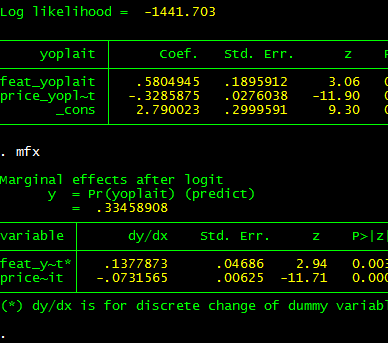
Here's the output to R's console. Note that feat.yoplait is a dummy variable for whether Yoplait had a featured advertisement that particular week. Based on my caveat, you wouldn't expect the output to be identical to Stata.


And, as you can see (compare with Stata output below), it isn't exactly the same, but if you are trying to understand the qualitative importance of your estimates, it isn't too bad.


Two bugs (quirks, kludges) remain: (1) I want to get the standard errors precisely right, (2) I want to convince mtable() to stop reporting the intercept for the marginal effects (as the intercept doesn't change, it can't have a marginal effect!). Even before I get around to this, I hope this code will have a positive marginal effect.

---

Update: The original post to which this post refers is no longer available because the TimeSeriesIreland Blog appears to have been taken down. I leave this post up subject to two caveats: (1) the standard errors are not quite right for the marginal effects and (2) the marginal effects for dummy regressors are not computed for a discrete jump from 0 to 1. Otherwise, you may find this tool useful.

Subject to the caveats in this post, if you want access to this function and a related function that is more summary()-like, I have included it in my CRAN-contributed package tonymisc (see the tab at the top of this page).

Tuesday, May 3, 2011

Putting Robust Standard Errors into LaTeX Tables: An Extension of mtable

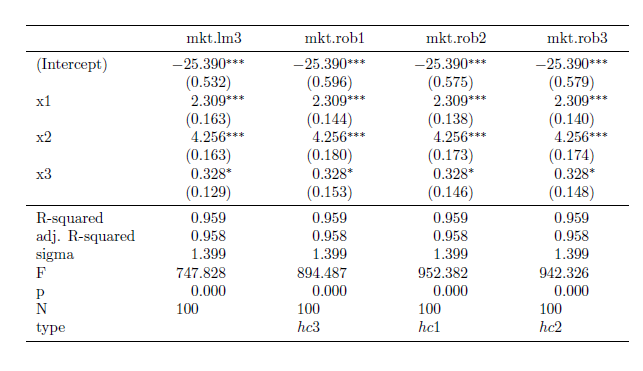
I recently discovered the mtable() command in the memisc library and its use with toLatex() to produce nice summary output for lm and glm objects in a nicely formatted table like this:


Once you have your linear model objects, all you need is one command -- a composite of toLatex() and mtable(). Here's the R code I used to generate the LaTeX code:


All you need to do from here is to copy the code into your LaTeX document (or in my case LyX document with evil red text), where you use the dcolumn and booktabs packages (specify this in the preamble using \uspackage{} for each package).

This is really straightforward ... as long as you just want to use lm or glm objects with no deviations from that baseline. But, what if you -- as many econometricians do -- want to estimate your linear model with heteroskedasticity-consistent standard errors?

How to do it with "robust" standard errors

My favorite way to robustify my regression in R is to use some code that John Fox wrote (and I found in an R-help forum). He called it summaryHCCM.lm(). In my own applications, I have renamed it summaryR() because "R" makes me think "robust" and it is fewer keystrokes than HCCM. I modified the output of the code to work better with what follows:


Suppose I would like to produce nicely-typed output like the above table, but with robust standard errors. Unfortunately, the summaryR() solution doesn't map naturally into our mtable() solution to producing nice LaTeX output. But, fortunately, there is a solution.

(If you just want this to work, copy and run all of the code from here to "so we are all set." No need to understand the implementation details. If you're interested in understanding how I arrived at my solution, here come the details)

It turns out that there is a way to map the summaryR() command to the mtable() command to produce nice LaTeX output with robust standard errors. Once we have the commands, the syntax is just as easy as using summaryR() directly and it makes creating LaTeX table output easy. So, what do we do?

First, we need to adapt the methods behind mtable() to allow it to recognize something that I call a "robust" object. To do this, we need to write a function called getSummary.robust()


and we need to set some formatting options using the setSummaryTemplate() command:


Second, we need to convert a linear models object into something called a "robust" object. The robust() command does this:


So, we are all set. If you run all of the preliminary code in this post, you're in good shape to produce LaTeX tables with robust standard errors like this table:


Once the functions are defined, the syntax is straightforward. Here is the code I used to put together the the table (plus, one step to copy the output into my LyX file)


I hope this is helpful. If you're interested in other extensions of mtable(), here's an excellent post.

Finally, I am still learning I learned how to bundle functions into a package (so I haven't made this available as a package yet). Today, I was able to successfully package this set of functions into a package called tonymisc on my computer. Once I organize the help/example/other fun parts of the package, I will see about making this and my extension for ivreg objects available. This package (in its first version) is available on CRAN through install.packages("tonymisc").

Friday, April 29, 2011

Forming Formulas

One of the first functions a new R user learns how to use is the lm() command, which involves stating the model formula.

lm(y~x1+x2, data=mydata)

After a while, this just becomes a natural way to say "I want a regression of y on x1 and x2 using mydata." Even though it is natural, the underlying structure of the formula is not as it first appears. This becomes apparent as soon as you need to work with formula objects when writing your own function.

Does ~ define a string? No. You can ask R directly whether the formula is a string (of class "character") using is.character().

is.character(y~x1+x2+x3)
[1] FALSE

As we will soon see, a formula isn't easily coerced into a string either.

Should we think of ~ as a fancy = sign? No. R doesn't think of ~ as defining an equation to be evaluated.

x1=5
x2=6
x3=7
y~x1+x2+x3
y ~ x1 + x2 + x3

It is better to think of ~ as defining the entire statement as an object with a special class called formula, which conveys the idea of the model to other functions in R.

For the rest of the post, I will show some calculations that illustrate more fundamentally what a formula object is. For concreteness, imagine you have a formula object with the general form y~x1+x2+z1+z2+z3.

You could define this object with the command:

form.ex = y~x1+x2+z1+z2+z3

Suppose our goal is to extract the first two explanatory variables (x1 and x2) and use them in a linear model for the response (y). If you're reading this for help, you likely have a more noble goal in mind. Take this as an illustrative example.

To appreciate the power of a method, it is useful to see the inelegant code we are avoiding. The inelegant code also shines some light on how a formula object differs from a string.

An inelegant method

We could gain access to the elements of the formula by coercing it into a character string using as.character(). If we do this in our example, we obtain a character vector of length three:

as.character(form.ex)
[1] "~"
[2] "y"
[3] "x1 + x2 + z1 + z2 + z3"

Here, we see that the RHS of the formula is stored in the third element of this vector. The response is in the second element of the vector. Let's store these into vectors we can easily reference and use.

rhs= as.character(form.ex)[3]
resp = as.character(form.ex)[2]

Next, we can splice the rhs vector to obtain the individual variable names using the strsplit command. Note: we want to split the vector apart using a delimiter " + " with the spaces. Because the + is an operator, we need to use " \\+ " instead. In addition, strsplit() returns a list of length two. We really want the first element of the list... (remember, this is the inelegant way).

rhs.sp = strsplit(rhs," \\+ ")[[1]]
rhs.sp
[1] "x1" "x2" "z1" "z2" "z3"

Now, we have a vector of variable names for the right hand side of the equation. As our goal is to construct a formula object relating the response to the first two explanatory variables, extract the first two elements of this vector.

rhs.new= rhs.sp[1:2]
rhs.new
[1] "x1" "x2"

And, paste this right hand side of the equation to the response variable name in a formula style using the following combination of paste() commands.

short.form=paste(resp,"~",paste(rhs.new,collapse="+"))
short.form
[1] "y ~ x1+x2"

Great. The only problem? The object short.form is not a formula object. It is a character string. This won't be a problem if we input it into something like lm(), which will coerce it to a formula object before using it.

lm(short.form, data=mkt.df)

Call:
lm(formula = short.form, data = mkt.df)

Coefficients:
(Intercept) x1 x2
-25.329 2.335 4.239

If you want to do the formula coercion yourself, you can use the as.formula() command as follows.

short.form=as.formula(short.form)
short.form
y ~ x1 + x2

A more elegant method

The all.vars() command does the splitting, splicing and extracting that comprised the bulk of what we did above. Starting with the formula object form.ex, we could create a vector of variable names in our model statement as:

vars.ex = all.vars(form.ex)
vars.ex
[1] "y" "x1" "x2" "z1" "z2" "z3"

Now, just define the rhs and resp vectors as we did in the less elegant method.

rhs = vars.ex[2:3]
resp = vars.ex[1]

Is there a better way recombine these vectors than to create our own paste collapser? Yes! The reformulate() function makes it easy.

myform=reformulate(rhs.av, response=resp)
myform
y ~ x1 + x2

And, for good measure, let's see what happens in the lm() command:

lm(myform, data=mkt.df)

Call:
lm(formula = myform, data = mkt.df)

Coefficients:
(Intercept) x1 x2
-25.329 2.335 4.239